AI is Calling Your Business: Will You Answer? A Home Service Guide to Google’s “Have AI Get Prices”
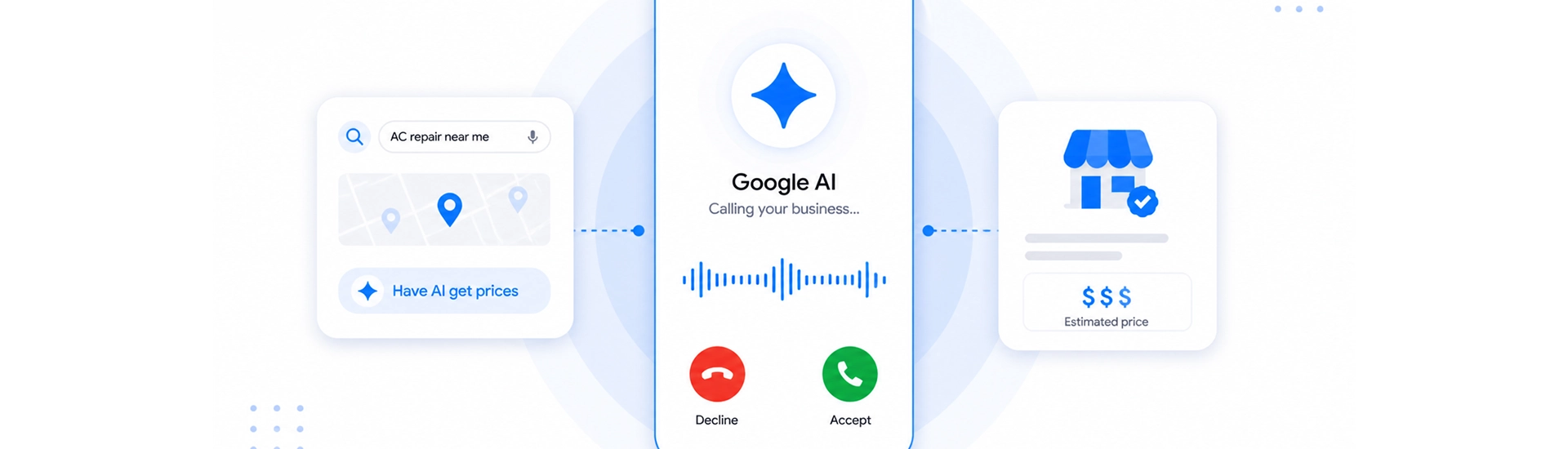
There’s a new caller in local search, and it isn’t a homeowner. It’s Google’s AI, and it’s reaching out to your business to ask about your prices before a potential customer ever picks up the phone themselves.
Google’s “Have AI Get Prices” feature is one of the most significant shifts in local search behavior in years. For home service providers, plumbers, HVAC technicians, electricians, roofers, pest control companies, and everyone in between, this feature changes the rules of how you get found, how you get evaluated, and ultimately, how you get hired.
This guide gives you the complete picture: what the feature is, how it works, who it affects, and what you need to do right now to stay competitive.
What Is Google’s “Have AI Get Prices” Feature?
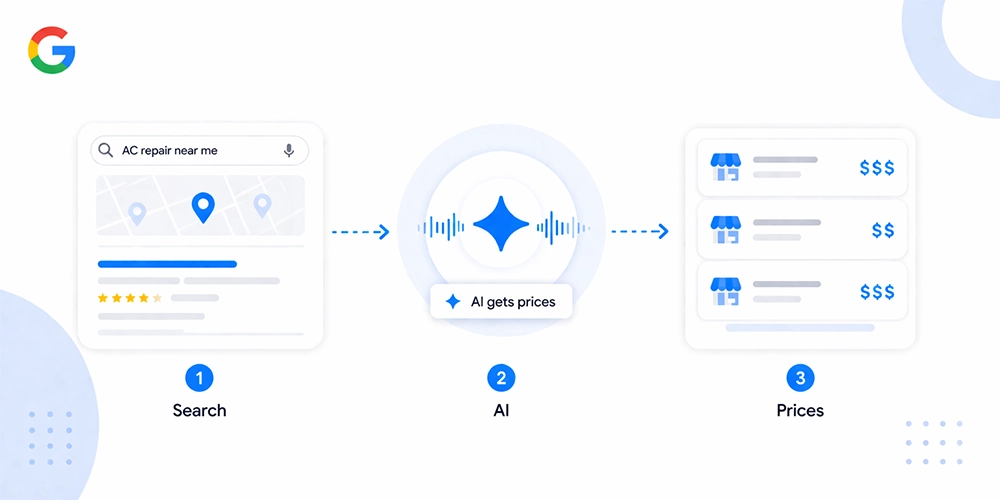
At its most basic, “Have AI Get Prices” is a Google search feature that allows users to prompt Google’s AI to contact a local business directly, on their behalf, to gather pricing information. Instead of the customer calling around for quotes, Google does the legwork.
Here’s how it typically plays out:
- A homeowner searches for a local service, say, “AC repair near me” or “emergency plumber Los Angeles.”
- In the local search results, they see an option that says something like “Have AI get prices.”
- They activate it. Google’s AI then reaches out to the businesses listed, via call, message, or both, to request pricing details.
- That pricing information is surfaced back to the user inside Google’s interface, often before they ever click through to any business’s website.
This means the first impression your business makes may no longer happen on your website, your Google Business Profile page, or even a phone call you initiate. It happens in a conversation between Google’s AI and whoever answers your phone.
The feature pulls information from multiple sources: your Google Business Profile, your website content, and in some cases, live outreach to your business. What Google’s AI finds, or doesn’t find, directly shapes whether you’re included in the results a homeowner sees.
Why Google Built This, and Why It Matters Now
To understand why this feature exists, you have to understand how homeowners actually behave when something breaks or needs fixing.
Most people don’t want to spend an hour making calls, leaving voicemails, and waiting for callbacks just to get a ballpark number. The research phase before hiring a home service professional has always been friction-heavy. Google’s AI is designed to eliminate that friction, and in doing so, it’s compressing the entire customer journey.
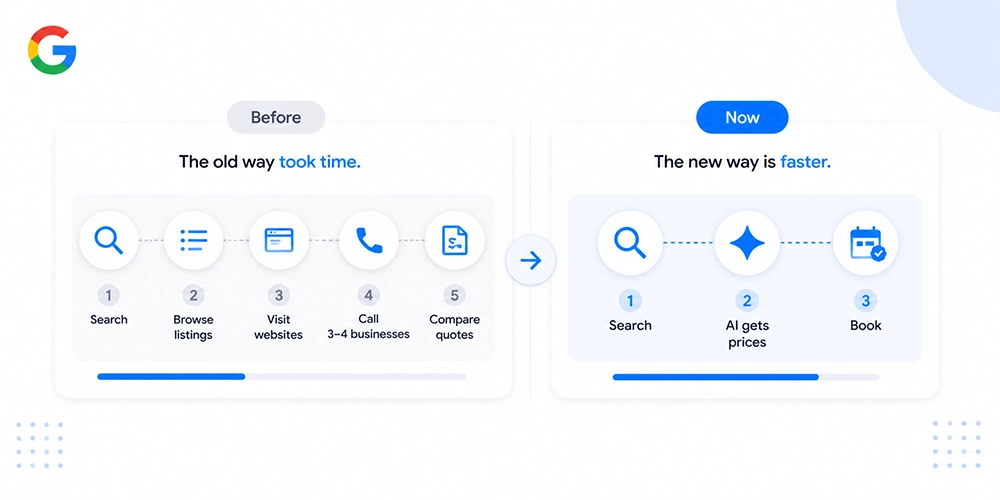
What used to look like this:
- Search → Browse listings → Visit websites → Call 3–4 businesses → Compare quotes → Book
Now looks more like this:
- Search → AI gets prices → Homeowner picks a provider → Books
That’s not a small shift. That’s a fundamental change in when and how your business gets evaluated. The decision window, the moment a homeowner is actively choosing between you and someone else, has moved earlier and gotten shorter.
For home service providers, this matters because the businesses that feed Google’s AI accurate, clear, and timely information will be the ones that show up at that critical decision moment. Those that don’t will be invisible when it counts most.
This isn’t a future concern. The feature is already active and expanding. Home service businesses that treat it as optional are already giving ground to competitors who don’t.
Which Home Service Businesses Are Affected?
If you operate in the local home services space, assume this feature affects you. Google has rolled it out with a clear focus on service-based businesses where price is a major factor in the hiring decision.
Categories currently in scope include:
- HVAC (heating, cooling, installation, repair)
- Plumbing (emergency, routine, installation)
- Electrical (residential, panel upgrades, repairs)
- Roofing (inspection, repair, replacement)
- Pest control
- Landscaping and lawn care
- Cleaning services (residential and commercial)
- Appliance repair
- Locksmith services
- General contracting and handyman services
The common thread? These are all categories where homeowners regularly comparison-shop on price, where urgency is common, and where trust and transparency directly influence who gets hired.
Businesses most at risk of being excluded from AI-surfaced results are those that:
- Have incomplete or outdated Google Business Profiles
- Don’t list any services or pricing information on their website or GBP
- Have slow or unreliable phone response (missed calls, long hold times, unclear pricing when asked)
- Use evasive or non-committal language when pricing comes up
The businesses that benefit most are those that make it easy for Google’s AI to find, understand, and communicate their pricing with confidence. That’s not complicated, but it does require intentional setup, which the next sections walk you through.
How the AI Actually Works (The Mechanics)
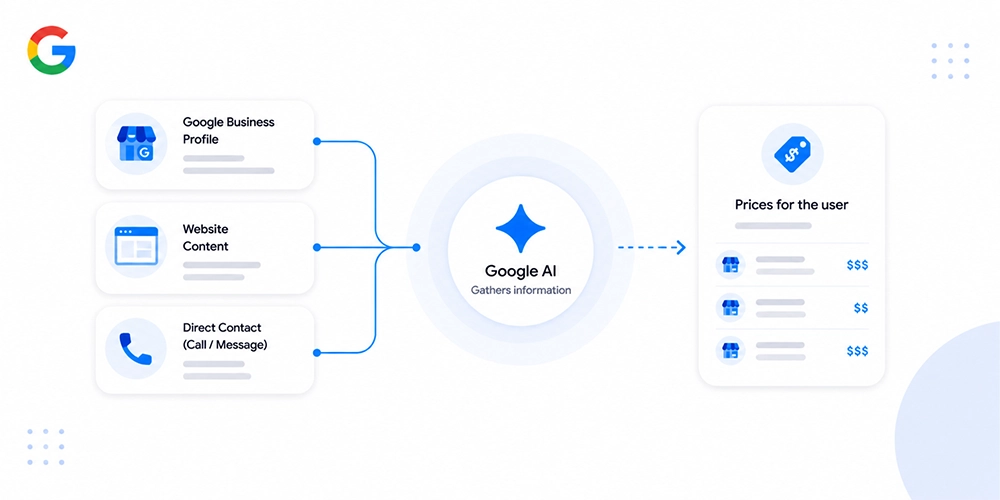
Understanding what’s happening under the hood isn’t just interesting, it’s strategically useful. When you know how Google’s AI gathers and presents pricing information, you can make smarter decisions about what to put where and how to communicate it.
Here’s what the process looks like from the AI’s perspective:
Step 1, It reads what’s already available.
Before making any outreach, Google’s AI scans your existing digital footprint. That means your Google Business Profile, your website’s service pages, any pricing pages you’ve published, and structured data (schema markup) you’ve added to your site. If that information is clear, current, and well-organized, the AI may not need to go further.
Step 2, It reaches out directly if needed.
When publicly available information is insufficient or outdated, Google’s AI can initiate a call or message to your business. The inquiry is typically direct: what does a specific service cost, what’s included, and how soon can you come out? It may not always identify itself as an AI, which makes staff training (covered in Section 8) critical.
Step 3, It compiles and surfaces the information.
Whatever it gathers gets organized and presented to the user inside Google’s search interface. The homeowner sees a snapshot, typically a price range, what’s included, and sometimes availability, alongside other businesses. From there, they choose.
A few important mechanics to understand:
- Accuracy matters more than impression. The AI doesn’t editorialize. It reports what it finds. If your prices are vague, outdated, or contradicted between your GBP and your website, that inconsistency can work against you.
- Speed affects inclusion. If your phone goes unanswered or response time is slow, the AI may move on to the next business. Being reachable isn’t just good customer service, it’s now an SEO variable.
- Transparency shapes trust signals. When the AI presents your prices alongside competitors, clarity wins. A clean “starts at $X” or “ranges from $X to $Y depending on scope” is more compelling, and more AI-friendly, than “call for a quote.”
The overall takeaway: Google’s AI behaves like a very efficient, impatient researcher. Give it what it needs quickly and clearly, and it will represent your business well. Make it work too hard, and it may simply skip you.
Impact on Local SEO & Your Google Business Profile
“Have AI Get Prices” doesn’t just change user behavior, it changes how local SEO actually works. Several assumptions that have held true in local search for the past decade are now being tested.
The Zero-Click Reality Is Accelerating
Zero-click searches, where a user gets their answer directly on the Google results page without visiting any website, have been growing for years. This feature pushes that trend further. When Google’s AI surfaces pricing from multiple businesses directly in the SERP, the homeowner may make a decision without ever clicking through to your website.
This doesn’t mean your website becomes irrelevant. It means your website now plays two roles simultaneously: one for human visitors and one for AI systems reading it for structured information. Both audiences need to be served.
Your Google Business Profile Is Now a Data Source, Not Just a Listing
Your GBP has always influenced local pack rankings. Now it also feeds an AI system that actively uses your profile data to answer customer queries in real time. That changes your optimization priorities.
Fields that were previously “nice to have” are now functionally important:
- Services section: Every service you offer should be listed with a clear, descriptive name and a short explanation of what’s included.
- Pricing fields: Where GBP allows pricing input (service items, menu), fill them in. Even ranges are better than blanks.
- Business description: Write it in plain language. Avoid jargon. The AI reads this.
- Q&A section: Proactively add and answer common pricing questions. This is one of the most underused sections in GBP and one of the highest-value for AI readability.
- Photos and updates: These reinforce credibility signals, which influence how prominently your profile is surfaced overall.
Traditional Ranking Factors Still Matter, But They’re No Longer Sufficient
Proximity, review volume, citation consistency, and website authority still influence where you appear in local results. The difference is that appearing in local results is now just the entry point. What happens next, whether the AI includes you in a price comparison or skips over you, depends on information quality, not just ranking signals.
Think of traditional local SEO as getting you to the table. “Have AI Get Prices” optimization is what determines whether you’re seated or left standing outside.
Reviews Carry More Weight in an AI-Mediated Environment
When the AI is presenting options side by side, review scores and recent review volume become tiebreakers. A business with 4.8 stars and 200 reviews will carry more trust weight than one with 4.2 stars and 30 reviews, even if their pricing is similar. Keeping your review pipeline active isn’t optional, it’s part of your competitive positioning in this new landscape.
How to Set Up & Optimize for “Have AI Get Prices”
There’s no single button to press to “activate” this feature for your business. Optimization is a combination of profile completeness, website structure, operational readiness, and content clarity. Here’s exactly what to do.
1. Complete and Sharpen Your Google Business Profile
Start here. Your GBP is the first place Google’s AI looks.
- Go through every field in your profile and fill in anything that’s blank or outdated
- List every service you offer, individually, not as a bulk category
- Add pricing wherever the platform allows, even if it’s a starting price or a range
- Write a business description that mentions your key services naturally and reads like something a helpful person wrote, not a keyword list
- Use the Q&A section to pre-answer: “How much does [service] cost?”, “Do you offer free estimates?”, “How quickly can you come out?”
- Respond to all existing reviews, this signals an active, engaged business
2. Optimize Your Website for AI Readability
Your website needs to serve two audiences now: the human visitor and the AI crawler reading it for structured data.
- Create dedicated, clearly titled service pages for each major service you offer
- Include transparent pricing language on each page, ranges, flat rates, or what affects the final price
- Use plain, direct headings like “How Much Does AC Repair Cost?” rather than vague or clever ones
- Add an FAQ section to your service pages that mirrors common pricing questions
- Make sure your NAP (Name, Address, Phone) is consistent across your site and matches your GBP exactly
3. Implement Schema Markup for Services and Pricing
Schema markup is structured data code added to your website that helps search engines, and AI systems, read and categorize your content with precision.
For home service businesses, the most valuable schema types are:
| Schema Type | What It Does |
| LocalBusiness | Identifies your business type, location, and contact info |
| Service | Describes individual services with names, descriptions, and pricing |
| FAQPage | Marks up Q&A content so it can be read and surfaced directly |
| PriceSpecification | Communicates price ranges and billing structures to AI systems |
If you’re not sure whether your schema is set up correctly, tools like Google’s Rich Results Test and Schema Markup Validator can check it for free.
4. Audit for Inconsistencies Across All Platforms
The AI cross-references. If your website says one price range and your GBP says another, that inconsistency undermines your credibility as a source. Do a quick audit:
- Does your GBP match your website on services, pricing language, and contact details?
- Are your listings on other directories (Yelp, Angi, HomeAdvisor, BBB) consistent?
- Is your phone number the same everywhere and answered reliably?
Inconsistencies aren’t just confusing to customers, they reduce the AI’s confidence in your data, which can mean you get left out of results entirely.
Pricing Transparency: What to List and How
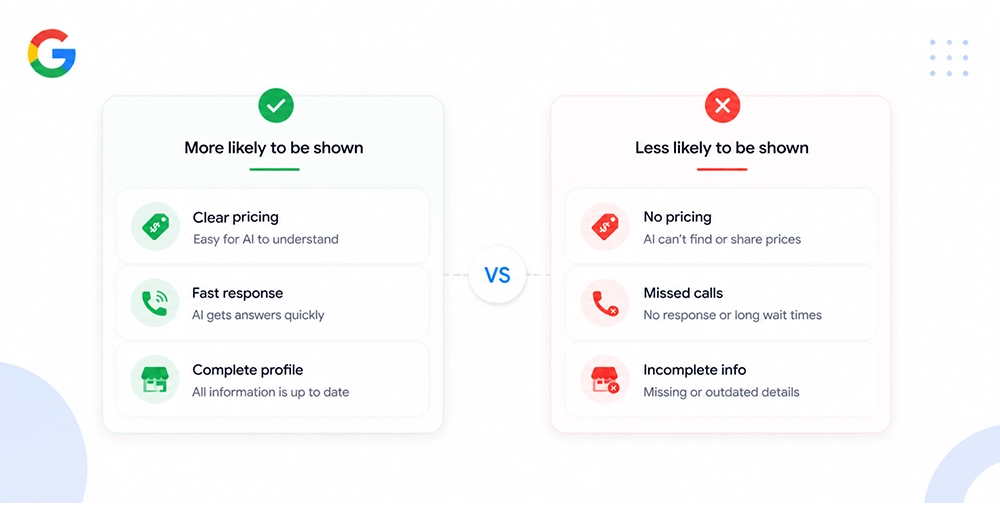
Pricing transparency is the single biggest lever home service businesses can pull to improve their performance with “Have AI Get Prices.” But there’s a common fear that stops many providers from publishing any numbers at all: “What if my prices scare people off?”
Here’s the reality. Homeowners are already comparison-shopping on price, with or without your help. If Google’s AI can’t get a clear answer from you, it will get one from your competitor and present that instead. Silence isn’t protection. It’s absence.
That said, publishing pricing doesn’t mean committing to a fixed number for every possible job. It means giving people, and the AI, enough to work with.
What to List
There are three practical approaches depending on your service type:
Starting prices work well for services with a clear minimum scope:
- “Drain cleaning starts at $89”
- “AC tune-up from $79”
Price ranges work well for jobs where scope varies:
- “Water heater installation typically ranges from $800 to $1,400 depending on unit type and existing setup”
- “Roof repair costs between $300 and $1,500 based on damage extent and materials”
Factors-based explanations work well for complex or highly variable jobs:
- “Electrical panel upgrades vary based on amperage, panel location, and local permit requirements. Most residential upgrades fall between $1,500 and $3,500.”
Each of these gives the AI something concrete to work with. Each also gives homeowners a realistic expectation, which reduces the kind of sticker-shock complaints and wasted call time that plague businesses with zero pricing visibility.
Where to List It
Don’t rely on one location. Publish pricing information across:
- Your Google Business Profile (service items, business description, Q&A)
- Individual service pages on your website
- Your website’s FAQ page
- Any booking or estimate request forms that confirm pricing context upfront
What Not to Do
Avoid these common mistakes:
- Listing prices that are significantly below your actual rates just to attract clicks, this creates distrust and poor-fit leads
- Using vague language like “competitive pricing” or “affordable rates”, these mean nothing to an AI and very little to a homeowner
- Leaving pricing fields blank with a note that says “call for pricing”, this is the digital equivalent of hanging up on the AI
Pricing transparency isn’t about racing to the bottom. It’s about communicating clearly so the right customers, the ones who are a genuine fit for your business, find you first.
Your Team Is Now Part of Your Marketing
This is the section most businesses overlook, and it’s the one with the most immediate impact.
If Google’s AI calls your business to inquire about pricing, what happens? Does someone answer? Do they know what to say? Do they give a consistent, confident response? Or does the call go to voicemail, or get met with “I’d have to ask the manager” or “it depends” with no follow-up?
Your front-line staff, whether that’s a dedicated receptionist, a dispatcher, or the business owner themselves, are now functioning as a direct input into your local search performance. How they handle AI-initiated inquiries shapes what information gets surfaced about your business.
Train Your Team for AI-Initiated Calls
Start by making sure your team knows this feature exists. Walk them through what an AI pricing inquiry might sound like. Google’s AI may not always announce itself, the call may sound like a standard customer inquiry. The difference is in the pattern: it will typically ask directly and specifically about pricing for a named service, without the usual small talk or urgency a real customer brings.
Train your team to:
- Answer within 3 rings. Response speed is a signal. Missed calls during business hours are a missed inclusion opportunity.
- Give clear, confident pricing answers. Equip them with a simple pricing guide they can reference immediately, ranges, starting points, what affects the final cost.
- Avoid evasive language. Phrases like “it really depends” or “I can’t say without seeing it” are natural in context but unhelpful to an AI gathering structured data. Follow them with a concrete range: “It really depends on the scope, but most jobs like that run between $X and $Y.”
- Log AI-suspected inquiries. If a call follows the pattern of an AI pricing inquiry, note it. This helps you track whether the feature is actively pulling your information and whether your responses are consistent.
Create a Simple Pricing Reference Sheet
This doesn’t need to be complicated. A one-page internal document, even a printed sheet at the front desk, that lists your most common services, starting prices, and typical ranges gives your team the confidence to answer pricing questions quickly and accurately every time.
This document should mirror the pricing language on your website and GBP. Consistency across human responses and digital content reinforces your credibility as a reliable data source for Google’s AI.
Answer the Phone During Business Hours, Every Time
This sounds obvious. In practice, it’s where many home service businesses lose ground. If your business hours on Google say 8am–6pm but calls routinely go to voicemail during that window, you’re sending conflicting signals to both customers and AI systems.
If staffing is a challenge, consider:
- A dedicated answering service for business hours
- A call-forwarding setup to a mobile number
- A clearly communicated callback policy with a realistic turnaround time listed on your GBP
Operational availability isn’t separate from marketing. At this point, it is marketing.
Streamlining Scheduling for AI-Driven Leads
When a homeowner gets pricing information from Google’s AI and decides to move forward, the next step is booking. How easy you make that step directly affects whether the lead converts, or bounces to whoever has a simpler path to yes.
Friction kills conversions. In an AI-mediated environment, that’s even more true because the homeowner has already done their comparison shopping. By the time they’re ready to book, they want the process to be fast and simple.
Make Online Booking Available
If you don’t currently offer online booking or an online estimate request form, this is the time to add one. A significant portion of homeowners, particularly those who interacted with the AI feature rather than calling directly, prefer to book digitally without a phone conversation.
Your booking process should:
- Be accessible from your homepage and every service page
- Ask for only the essential information (service needed, location, preferred date/time, contact info)
- Confirm the appointment or inquiry immediately with an automated response
- Set clear expectations about next steps (e.g., “We’ll confirm your appointment within 2 hours during business hours”)
Align Your Availability With Your GBP
One of the most common disconnects that hurts home service businesses is listing business hours on their GBP that don’t reflect actual scheduling availability. If a homeowner tries to book for a time your GBP says you’re open but you’re not, that’s a trust erosion moment.
Audit your GBP hours regularly. If you offer emergency or after-hours service, say so explicitly, both on your profile and on your website. That availability signal can be a meaningful differentiator when Google’s AI is comparing options.
Use Confirmation and Follow-Up Touchpoints
Once a lead books or submits an inquiry, the job isn’t done. A quick confirmation text or email that reinforces what to expect, technician name, arrival window, what to prepare, reduces no-shows, builds trust, and creates a better first impression before the service even happens.
These small operational details compound. A business that books cleanly, communicates proactively, and shows up on time is the business that earns the kind of reviews that further strengthen its position in AI-surfaced results.
Content Strategy: Answer What Customers Are Asking
Your website content has always needed to serve the people searching for your services. Now it needs to serve the AI systems interpreting those searches on their behalf too. The good news: those two goals are almost perfectly aligned.
Google’s AI surfaces answers from content that is clear, specific, and structured around real questions. That’s exactly what good home services content has always looked like when done right.
Identify the Price-Related Questions in Your Niche
Start with the questions your customers actually ask, on calls, in emails, in reviews, in estimate requests. For most home service businesses, the pattern is consistent:
- “How much does [service] cost?”
- “What affects the price of [service]?”
- “Do you charge for estimates?”
- “Is there an emergency or after-hours fee?”
- “What’s included in [service package]?”
These aren’t just customer service questions. They’re search queries. And when your content answers them directly, it becomes the source Google’s AI draws from when a homeowner activates “Have AI Get Prices.”
Structure Your Service Pages for AI Extraction
Each service page on your website should follow a structure that both humans and AI systems can navigate easily:
- Clear H1: Name of the service, written plainly (e.g., “AC Repair Services”)
- Short intro paragraph: What the service is, who it’s for, and a brief pricing signal
- “How Much Does It Cost?” section: A dedicated subsection with transparent pricing language
- “What Affects the Price?” section: Variables that influence cost, scope, materials, urgency
- FAQ block: 4–6 questions and direct answers at the bottom of the page
This structure serves a visitor who lands on the page. It also gives the AI a clean, parseable content hierarchy to pull from when building a pricing summary.
Use Conversational, Question-Based Headings
One of the simplest content upgrades you can make is changing vague headings to question-based ones. Compare:
| Vague Heading | AI-Optimized Heading |
| “Our Pricing” | “How Much Does Furnace Repair Cost?” |
| “Services We Offer” | “What Plumbing Services Do We Provide?” |
| “About Our Process” | “What Happens During an Electrical Inspection?” |
Question-based headings match the exact language homeowners use in search. They also create natural anchor points for AI systems pulling direct answers from your content.
Should You Opt Out? The Real Cost of Saying No
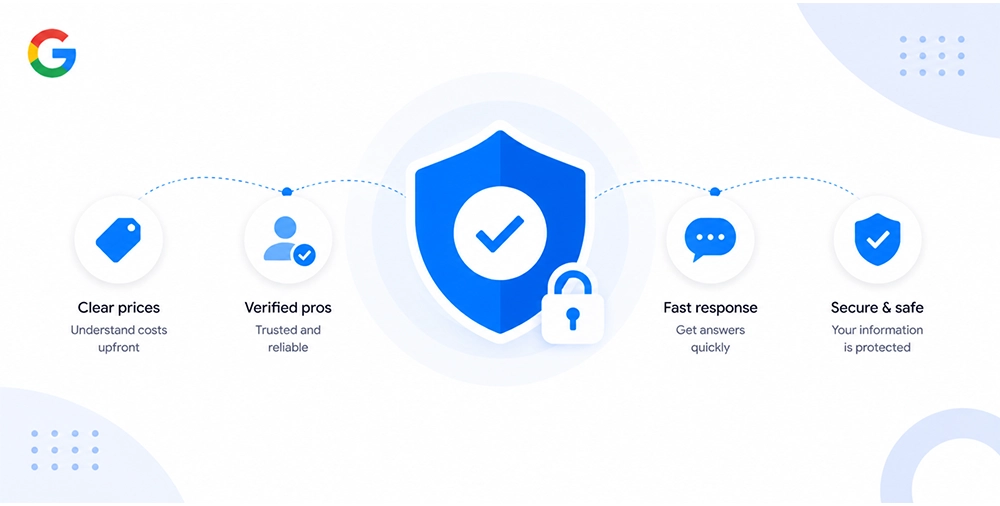
Some home service providers have considered opting out of “Have AI Get Prices” entirely, either out of concern about AI accuracy, pricing exposure, or simply uncertainty about how it works. That’s an understandable instinct. But it carries real consequences worth thinking through clearly.
What Opting Out Actually Means
Opting out means Google’s AI will not actively surface your business when a homeowner uses this feature to gather pricing. You won’t appear in that comparison moment. The homeowner will see your competitors, and make a decision without you ever being part of the conversation.
You don’t disappear from Google entirely. Your organic rankings, your GBP listing, and your ads (if you run them) still function. But you lose presence at a specific, high-intent moment in the customer journey, the moment someone is actively ready to hire.
The Competitive Reality
Every competitor who stays in will have a visibility advantage at that decision point. Over time, as this feature expands and more homeowners use it as their default way to compare service providers, opting out becomes progressively more costly.
The businesses that build strong AI-readability now, while the feature is still relatively new, will compound that advantage as adoption grows. Those that wait will face a steeper catch-up curve.
When Opting Out Might Make Sense
There are narrow scenarios where opting out could be reasonable:
- Your business operates by referral only and does not depend on inbound search traffic
- You serve a highly specialized niche where price comparison is not a primary decision driver
- You have legitimate operational reasons why AI-initiated inquiries create problems
For the vast majority of home service businesses competing for inbound local leads, opting out is a competitive disadvantage dressed up as caution.
How to Test This Feature on Your Own Business
Before you optimize, audit. Knowing exactly how your business currently appears, or doesn’t appear, in “Have AI Get Prices” results gives you a clear baseline to work from.
Step-by-Step: Test It Like a Homeowner
- Open Google on a mobile device or desktop browser, ideally in an incognito window to reduce personalization bias
- Search for your primary service in your city (e.g., “HVAC repair [your city]”)
- Look for the “Have AI Get Prices” prompt in the local results, it may appear as a button or option near the local pack
- Activate it and observe: Does your business appear? What information does the AI surface about you? How does it compare to what competitors show?
- Call your own business number as a test inquiry, ask a pricing question the way the AI would. Note how your team responds, how quickly they answer, and whether the information given matches what’s on your website and GBP
What to Look For
- Is your business included in the AI’s price comparison at all?
- Is the pricing information accurate and current?
- Is the language consistent with how you describe your services elsewhere?
- Are there gaps, services you offer that aren’t reflected?
Run this test quarterly. Google’s AI behavior and feature rollout continue to evolve, and your optimization should evolve with it.
The Future of Agentic Search for Home Services
“Have AI Get Prices” is not the destination. It’s the opening move in a much larger shift toward what’s called agentic search, AI that doesn’t just answer questions but takes actions on behalf of users.
The trajectory is clear. What starts with price gathering will extend to:
- Booking and scheduling, AI that not only gets prices but books the appointment directly
- Follow-up and confirmation, automated check-ins handled between the AI and your business systems
- Service history and personalization, AI that remembers a homeowner’s past service providers and proactively reaches out on their behalf when maintenance is due
For home service businesses, this means the operational infrastructure you build today, transparent pricing, reliable phone coverage, online booking, consistent digital information, becomes the foundation your business competes on in an increasingly AI-mediated local market.
The businesses that will win in this environment are not necessarily the biggest or the cheapest. They’re the ones that are easiest for AI systems to work with, clear, consistent, responsive, and well-organized. Those qualities have always made for a good business. Now they’re also the criteria by which AI decides who gets seen.
Start building that foundation now, while the advantage is still available to those willing to move first.
Ready to Make Your Business AI-Ready?
The shift toward AI-mediated local search is happening whether home service businesses are prepared for it or not. The providers who act now, optimizing their profiles, clarifying their pricing, training their teams, and structuring their content, will be the ones Google’s AI recommends when a homeowner is ready to hire.
At COLAB, we help home service businesses build the kind of digital presence that performs in today’s search environment and the one that’s coming next. From Google Business Profile optimization to service page content strategy and technical SEO, we put the right infrastructure in place so your business shows up, and shows well, at every touchpoint that matters.
If you’re ready to get your business AI-ready, get in touch with COLAB and let’s build something that works.
Frequently Asked Questions
Not directly as a ranking factor, but indirectly it matters significantly. Businesses with complete, well-optimized GBPs are more likely to be included in AI-surfaced results. And inclusion in those results drives engagement signals that can reinforce your overall local visibility over time.
Yes, with context. You don’t need to commit to a single fixed price for every job. Starting prices, ranges, and factors-based explanations all give the AI useful data to work with. Vague language like “call for pricing” is the least useful option and the one most likely to result in your business being skipped.
Train your team to answer pricing questions clearly and confidently using a simple internal pricing reference guide. Ensure phones are answered promptly during business hours. Brief staff on what an AI pricing inquiry might sound like, direct, specific, without the personal context a real customer typically brings.
You can opt out, but doing so removes your business from the AI’s price comparison results at a high-intent moment in the customer decision process. For most home service businesses competing on inbound local search, the cost of opting out outweighs the perceived benefit.
If you offer a residential or commercial service where price is part of the hiring decision, assume it applies. The feature is actively expanding across home services categories. Optimizing now puts you ahead of competitors who wait for it to become unavoidable.